Paytm stands for Pay Through Mobile, It is India’s one of the most popular mobile recharge, DTH service provider for mobile device with payment app.
This company founded by Vijay Shankar Sharma in 2010. Initially it only offers mobile recharge and DTH recharge service. But after sometime it also offers electricity bill payment, gas bill payment, bus booking, movie ticket booking, gold purchase and much more.
In august 2015 Reverse Bank of India give permission to this company for Payments Bank. The best part of paytm is available in 10 different language. Today there are more than 7+ million Indian merchants using QR code service to accept payment in India bank account at free of charge.
Step to Delete Your Paytm Account Permanently
Paytm is my most used and daily addictive application because it provide awesome service to it’s customers with good customer support. But I don’t know why you want to delete paytm account permanently. If it possible why you want to do this then feel free to comment below.
If you still want to delete paytm account then here you can find detailed guide to deactivate paytm account.
- Open paytm app in your android device. If you don’t have then download from Google Play Store.
- Now login with your email id or mobile number.
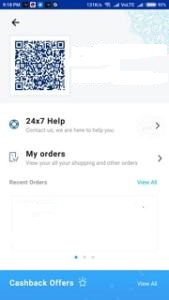
- After that go to profile section and click on 24×7 option.
- Here you can find list of options, simply click on “Managing my account”.
- Click on “I am unable to access my account”.
- In next screen click on “I need to block my account”.
- Now simply click on “Message Us” Button for send message to customer care support team.
- There are two options available if you want to upload any photo for proof then select photo by click on Upload a Photo option.
- Write description about why you want to do this and within 4-5 days your account will be deleted.